

Templates
A template is a named set of services, functions and databases that Geass creates in a project in one step. Use one to start a known stack, such as a database with a web UI, or to copy a stack you built so you can create it again in another project. Templates do not run anything by themselves: they add drafts to your canvas, and you review them and deploy.
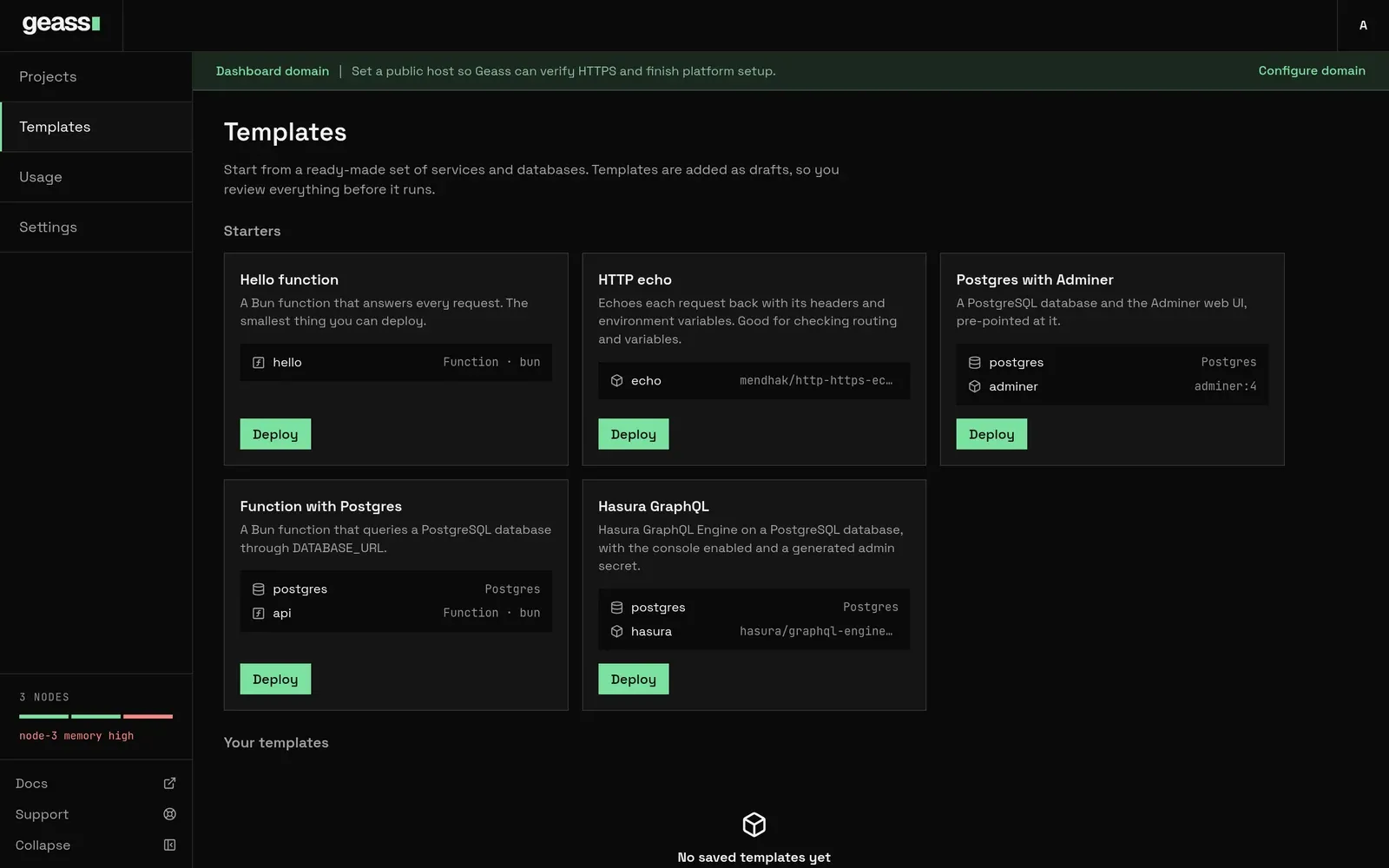 Screenshot with example data.
A template is not a Helm chart. Geass has no Helm-based templates. A template is a list of Geass resources.
Before you start
Section titled “Before you start”You need to be an admin. A read-only user sees “Your viewer role cannot browse templates.” on the Templates page.
The Templates page
Section titled “The Templates page”Choose Templates in the left rail. The page has two groups:
- Starters: the templates that ship with Geass.
- Your templates: templates you saved from a project. It reads “No saved templates yet” until you save one.
Each card shows the template’s name and description and a list of its resources, with the image, the database engine, or
Function · bun. A saved template also has a trash button. You can also reach the same list from a project: From
template above the canvas opens this page, and + Add resource → Template lists the templates in the add box.
Choosing one there adds it to the current environment at once, without the Project and Environment choices.
Built-in templates
Section titled “Built-in templates”| Template | What it creates |
|---|---|
| Hello function | One Bun function, hello, that answers every request. The smallest thing you can deploy. |
| HTTP echo | One service, echo, running mendhak/http-https-echo:41 on port 8080. It echoes each request with its headers and environment variables. It sets ECHO_INCLUDE_ENV_VARS=1, APP_NAME=geass-demo, APP_ENV=staging and FEATURE_FLAG=true. |
| Postgres with Adminer | A Postgres database, postgres, and a service, adminer, running adminer:4 on port 8080 with ADMINER_DEFAULT_SERVER set to the database’s host. |
| Function with Postgres | A Postgres database and a Bun function, api, that queries it. DATABASE_URL is a reference to the database’s connection string. |
| Hasura GraphQL | A Postgres database and a service, hasura, running hasura/graphql-engine:v2.40.0 on port 8080. It gets HASURA_GRAPHQL_DATABASE_URL from the database, the console enabled, and a generated HASURA_GRAPHQL_ADMIN_SECRET. |
Deploy a template
Section titled “Deploy a template”- On the Templates page, choose Deploy on a card.
- In Deploy template name, choose the Project. The list also has New project, which creates a project with a
productionenvironment first. If the project has more than one environment, choose the Environment. - Choose Add to project.
Geass opens the project and shows a toast: “Template added as drafts. Review them, then deploy.” The new resources are drafts with a New badge. Open them to check or change settings, then choose Deploy changes in the top bar. See Projects and environments.
What Geass creates for each resource:
| Resource | Created as |
|---|---|
| A database | An in-cluster database of that engine, with the default size and volume (10 GiB for Postgres and MySQL, 1 GiB for SQLite) and backups turned on where the engine supports them. |
| A service | A draft with one replica, the default size (0.1 CPU, 128 MB) and the port from the template (8080 if it names none). No domain. |
| A function | The same as a service, with the template’s runtime, code, mode and schedules. The schedules start when you deploy the function, like any other change. |
| A literal variable | A service variable with that value. |
| A generated secret | A service secret with a new random value, 32 hexadecimal characters. Each deploy of the template makes a new one. |
| A database reference | An environment variable that reads the new database’s connection string or one part of it. |
Every resource gets a generated ID such as calm-river, and the template’s name for it as its display name. If creating any
resource fails, Geass removes the ones it already created, so a failed deploy leaves nothing behind.
A few things to know after you deploy a template:
- A service that references a database starts once the database is ready. Until then its pods wait with
CreateContainerConfigError, which is expected. - Backups are on by default for new Postgres, MySQL and SQLite databases, but they protect nothing until the project has backup storage. See Backups and restore. Turn them off in the database’s settings if you do not want them.
- The dashboard never shows secret values, so it cannot show a generated secret. Read it with
kubectl, or replace it with a value you choose by adding a secret of the same name on the service’s Variables tab:
kubectl -n geass-system get secret <hasura service ID>-secrets \ -o jsonpath='{.data.HASURA_GRAPHQL_ADMIN_SECRET}' | base64 -dSave your own template
Section titled “Save your own template”Turn a project’s environment into a template:
- Open the project’s Settings → General.
- In Generate Template from Project, enter a Template name and optionally a Description. If the project has more than one environment, choose the Environment.
- Choose Generate template. A View in Templates link appears.
Geass saves the services, functions and in-cluster databases of that environment. It keeps:
- for a service, its image, or its repository and branch, its port (when it is not 8080), and its variables: the plain variables (empty ones are dropped), references to databases in the same environment, and each secret as “generate a new secret”;
- for a function, its runtime, code, mode (
httporevent), schedules and variables; - for a database, its engine and version.
It does not keep sizes, replicas, domains, sleep-when-idle settings, health checks, build settings, shared variables, backup settings or volume sizes, and it never copies a secret’s value. Resources it cannot include are listed under the form: “Not included: …” (buckets, logical databases, and databases outside the cluster, such as AWS RDS or PlanetScale). An environment with nothing to save is refused: “this environment has no services or in-cluster databases to save”.
Delete a saved template with the trash button on its card and confirm in Delete template?. Projects that already used it are not affected. Built-in templates cannot be deleted.
Write a template by hand
Section titled “Write a template by hand”A saved template is a ConfigMap in geass-system. You can write one yourself, for example to keep templates in version
control. The ConfigMap must be named template-<id>, carry the label geass.dev/template: "true", and hold the
template in the key template.json:
apiVersion: v1kind: ConfigMapmetadata: name: template-acme-stack namespace: geass-system labels: geass.dev/template: "true"data: template.json: | { "id": "acme-stack", "name": "Acme stack", "description": "The storefront with its database.", "resources": [ { "key": "database", "kind": "database", "name": "postgres", "engine": "Postgres" }, { "key": "web", "kind": "service", "name": "storefront", "image": "ghcr.io/acme/storefront:1.4.0", "port": 3000, "variables": [ { "name": "DATABASE_URL", "from": { "resource": "database", "key": "uri" } }, { "name": "SESSION_SECRET", "generate": "secret" }, { "name": "LOG_LEVEL", "value": "info" } ] } ] }kubectl apply -f template-acme-stack.yamlkubectl -n geass-system get configmaps -l geass.dev/template=trueThe template appears under Your templates. The rules Geass checks:
| Field | Rule |
|---|---|
id |
Lowercase letters, digits and dashes. The ConfigMap name must be template- plus the id. It cannot reuse a built-in ID. |
name, description |
name is required, up to 80 characters. description is up to 400. A resource’s name is up to 63. |
resources |
1 to 25. Each has a unique key of lowercase letters, digits and dashes, starting with a letter, up to 31 characters. |
kind |
service, function or database. |
| Service | Exactly one of image or repository (owner/name, with optional branch, default main). port 0 to 65535. |
| Function | runtime (bun, node or python) and code, within the function limits. Optionally mode (http, the default, or event) and up to 8 triggers, each with a name, a schedule and optionally a path and a payload, under the rules in Functions. A service cannot have runtime, code, mode or triggers. |
| Database | engine of Postgres, MySQL, Redis or SQLite, and an optional version. A database has no variables. |
variables |
Up to 100 per resource, with names of letters, digits and underscores. Each has one of value, generate (only "secret") or from (resource is a database key in the same template, key is one of uri, host, port, username, password, database). |
| Size | Geass refuses to save a template over 900 KB. A ConfigMap is itself limited to 1 MiB. |
A function resource looks like this. It goes in the resources list next to the others:
{ "key": "report", "kind": "function", "name": "report", "runtime": "node", "mode": "event", "code": "export async function handler(event) { return { ok: true, trigger: event.trigger }; }", "triggers": [{ "name": "nightly", "schedule": "0 3 * * *" }]}A template that breaks a rule is not listed. Geass skips it and logs “Skipped invalid template”.
Through the API
Section titled “Through the API”All of these need a workspace admin token. See the REST API.
curl -H "Authorization: Bearer $GEASS_TOKEN" https://geass.example.com/api/templates
curl -X POST https://geass.example.com/api/templates/postgres-adminer/deploy \  -H "Authorization: Bearer $GEASS_TOKEN" -H "Accept: application/json" \  -d project=proj-1a2b3c4d -d environment=staging
curl -X POST https://geass.example.com/api/templates/acme-stack/delete \  -H "Authorization: Bearer $GEASS_TOKEN" -H "Accept: application/json"
Saving uses POST /api/templates/create with project, environment, name and description; the answer includes the
template and a skipped list.
What happens under the hood
Section titled “What happens under the hood”- Built-in templates are part of the operator binary. Saved templates are ConfigMaps named
template-<id>ingeass-system, labelledgeass.dev/template=true, with the template intemplate.json. The ID of a saved template is the slug of its name plus four random characters. - Deploying creates
GeassDatabaseobjects first, thenGeassAppobjects, ingeass-system, marked as drafts with thegeass.dev/deploy-workflowannotation and a pendingcreatedchange. A secret goes into<service ID>-secrets. - A database reference becomes an
enventry that reads a key of<database ID>-connection, the same as Add reference.
Troubleshooting
Section titled “Troubleshooting”“project was not found” or “environment was not found in this project”. The project or environment in the request
does not exist. In the dialog, pick from the lists. Through the API, send the project’s ID (proj-…), not its name.
“template is not valid: …”. A hand-written template breaks a rule in the table above, or a function’s schedule breaks a schedule rule. The message names the resource and the field.
My ConfigMap template is not listed. Check the name is exactly template-<id> with the same id inside, the label is
set, and look for a “Skipped” line in kubectl -n geass-system logs deploy/geass-controller-manager | grep -i template.
A service is stuck on CreateContainerConfigError. It references the database’s connection Secret, which exists
only once the database is deployed and ready. Deploy the database and wait.
A repository service from a template will not build. The project was not linked to GitHub when you deployed the template, so the service has no GitHub connection. Delete it, link the project, and deploy the template again.
Saving fails with “this environment has no services or in-cluster databases to save”. Buckets, logical databases and external databases are not included, and the environment has nothing else.
Saving fails with “this environment is too large to save as a template”. The template would be over 900 KB, usually because of function code.
The new database is marked “Not backed up” or “Needs storage”. The card says “Not backed up” and the database’s Backups tab says “Needs storage”. Backups are on and the project has no backup storage. See Backups and restore.